Project 4: Scheme Interpreter
Eval calls apply,
which just calls eval again!
When does it all end?
Introduction
Important submission note: For full credit:
- submit with Parts I and II complete by Friday, 12/13 (worth 1 pt), and
- submit the entire project by Sunday, 12/22.
The Scheme project involves writing an interpreter for the Scheme language which is no small task! Start working on the project now! There are many parts and students often get stuck throughout the project so it's best to solve these problems early while there's still plenty of time. Remember that you can ask questions about the project in lab and office hours too!
We've also written a language specification and built-in procedure reference for the CS 61A subset of Scheme that you'll be building in this project. Reading the entirety of either of these documents should not be necessary, but we'll point out useful sections from the documentation in each part of the project.
In this project, you will develop an interpreter for a subset of the Scheme language. As you proceed, think about the issues that arise in the design of a programming language; many quirks of languages are byproducts of implementation decisions in interpreters and compilers. The subset of the language used in this project is described in the functional programming section of Composing Programs. Since we only include a subset of the language, your interpreter will not exactly match the behavior of other interpreters.
You will also implement some small programs in Scheme. Scheme is a simple but powerful functional language. You should find that much of what you have learned about Python transfers cleanly to Scheme as well as to other programming languages.
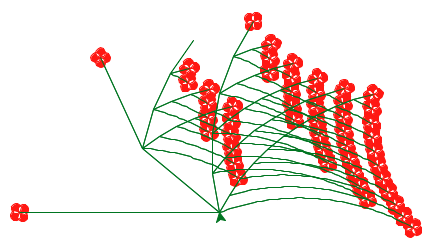
Later, there will also be an open-ended graphics contest (released separately) that challenges you to produce recursive images in only a few lines of Scheme. As an example, the picture above abstractly depicts all the ways of making change for $0.50 using U.S. currency. All flowers appear at the end of a branch with length 50. Small angles in a branch indicate an additional coin, while large angles indicate a new currency denomination. In the contest, you too will have the chance to unleash your inner recursive artist.
Download starter files
You can download all of the project code as a zip archive. This
project includes several files, but all of your changes will be made to only
four: scheme.py, scheme_reader.py, questions.scm, and tests.scm. Here
are all the files included in the archive:
scheme.py: implements the REPL and a evaluator for Scheme expressionsscheme_reader.py: implements the reader for Scheme inputscheme_tokens.py: implements the tokenizer for Scheme inputscheme_builtins.py: implements built-in Scheme procedures in Pythonbuffer.py: implements theBufferclass, used inscheme_reader.pyucb.py: utility functions for use in 61A projectsquestions.scm: contains skeleton code for Phase IIItests.scm: a collection of test cases written in Scheme
Logistics
This is a 20-day project. You may work with one other partner. You should not share your code with students who are not your partner or copy from anyone else's solutions. In the end, you will submit one project for both partners. We strongly encourage you to work on all parts of the project together rather than splitting up the work. Switch off who writes the code, but whoever is not coding should contribute by looking at the code and providing comments on a direction to go and catching bugs.
The project is worth 25 points. 24 points are assigned for correctness, including 1 point for passing tests.scm, and 1 point
for submitting Parts I and II by the first checkpoint.
You will turn in the following files:
scheme_reader.pyscheme.pyquestions.scmtests.scm
You do not need to modify or turn in any other files to complete the project.
For the functions that we ask you to complete, there may be some initial code that we provide. If you would rather not use that code, feel free to delete it and start from scratch. You may also add new function definitions as you see fit.
However, please do not modify any other functions. Doing so may result in your code failing our tests. Also, please do not change any function signatures (names, argument order, or number of arguments).
Throughout this project, you should be testing the correctness of your code. It is good practice to test often, so that it is easy to isolate any problems. However, you should not be testing too often, to allow yourself time to think through problems.
We recommend that you submit after you finish each problem. Only your last submission will be graded. It is also useful for us to have more backups of your code in case you run into a submission issue.
Interpreter details
Scheme features
Read-Eval-Print. The interpreter reads Scheme expressions, evaluates them, and displays the results.
scm> 2
2
scm> (+ 2 3)
5
scm> ((lambda (x) (* x x)) 5)
25
The starter code for your Scheme interpreter in scheme.py can successfully
evaluate the first expression above, since it consists of a single number. The
second (a call to a built-in procedure) and the third (a computation of 5
factorial) will not work just yet.
Load. You can load a file by passing in a symbol for the file name.
For example, to load tests.scm, evaluate the following call expression.
scm> (load 'tests)Symbols. Various dialects of Scheme are more or less permissive about identifiers (which serve as symbols and variable names).
Our rule is that:
An identifier is a sequence of letters (a-z and A-Z), digits, and characters in
!$%&*/:<=>?@^_~-+.that do not form a valid integer or floating-point numeral.
Our version of Scheme is case-insensitive: two identifiers are considered identical if they match except possibly in the capitalization of letters. They are internally represented and printed in lower case:
scm> 'Hello
hello
Turtle Graphics. In addition to standard Scheme procedures, we include
procedure calls to the Python turtle package. This will come in handy
for the contest.
You can read the turtle module documentation online.
Note: The turtle Python module may not be installed by default on your
personal computer. However, the turtle module is installed on the
instructional machines. So, if you wish to create turtle graphics for this
project (i.e. for the contest), then you'll either need to setup turtle on
your personal computer or use university computers.
Implementation overview
Here is a brief overview of each of the Read-Eval-Print Loop components in our interpreter. Refer to this section as you work through the project as a reminder of how all the small pieces fit together!
Read: This step parses user input (a string of Scheme code) into our interpreter's internal Python representation of Scheme expressions (e.g. Pairs).
- Lexical analysis has already been implemented for you in the
tokenize_linesfunction inscheme_tokens.py. This function returns aBuffer(frombuffer.py) of tokens. You do not need to read or understand the code for this step. - Syntactic analysis happens in
scheme_reader.py, in thescheme_readandread_tailfunctions. Together, these mutually recursive functions parse Scheme tokens into our interpreter's internal Python representation of Scheme expressions. You will complete both functions.
- Lexical analysis has already been implemented for you in the
Eval: This step evaluates Scheme expressions (represented in Python) to obtain values. Code for this step is in the main
scheme.pyfile.- Eval happens in the
scheme_evalfunction. If the expression is a call expression, it gets evaluated according to the rules for evaluating call expressions (you will implement this). If the expression being evaluated is a special form, the correspondingdo_?_formfunction is called. You will complete several of thedo_?_formfunctions. - Apply happens in the
scheme_applyfunction. If the function is a built-in procedure,scheme_applycalls theapplymethod of thatBuiltInProcedureinstance. If the procedure is a user-defined procedure,scheme_applycreates a new call frame and callseval_allon the body of the procedure, resulting in a mutually recursive eval-apply loop.
- Eval happens in the
- Print: This step prints the
__str__representation of the obtained value. - Loop: The logic for the loop is handled by the
read_eval_print_loopfunction inscheme.py. You do not need to understand the entire implementation.
Exceptions. As you develop your Scheme interpreter, you may find that
Python raises various uncaught exceptions when evaluating Scheme expressions.
As a result, your Scheme interpreter will halt. Some of these may be the
results of bugs in your program, but some might just be errors in user
programs. The former should be fixed by debugging your interpreter
and the latter should be handled, usually by raising a SchemeError. All
SchemeError exceptions are handled and printed as error messages by the
read_eval_print_loop function in scheme.py. Ideally, there should never
be unhandled Python exceptions for any input to your interpreter.
Running the interpreter
To start an interactive Scheme interpreter session, type:
python3 scheme.pyYou can use your Scheme interpreter to evaluate the expressions in an input file
by passing the file name as a command-line argument to scheme.py:
python3 scheme.py tests.scmCurrently, your Scheme interpreter can handle a few simple expressions, such as:
scm> 1
1
scm> 42
42
scm> true
#t
To exit the Scheme interpreter, press Ctrl-d or evaluate the exit procedure
(after completing problems 3 and 4):
scm> (exit)Part 0: Testing Your Interpreter
The tests.scm file contains a long list of sample Scheme expressions and
their expected values. Many of these examples are from Chapters 1 and 2 of
Structure and Interpretation of Computer Programs, the textbook from
which Composing Programs is adapted.
Part I: The Reader
Important submission note: For full credit:
- submit with Parts I and II complete by Friday, 12/13 (worth 1pt).
All changes in this part should be made in
scheme_reader.py.
In Parts I and II, you will develop the interpreter in several stages:
- Reading Scheme expressions
- Symbol evaluation
- Calling built-in procedures
- Definitions
- Lambda expressions and procedure definition
- Calling user-defined procedures
- Evaluation of special forms
The first part of this project deals with reading and parsing user input. Our reader will parse Scheme code into Python values with the following representations:
| Input Example | Scheme Expression Type | Our Internal Representation |
|---|---|---|
scm> 1
| Numbers | Python's built-in int and float values |
scm> x
| Symbols | Python's built-in string values |
scm> #t
| Booleans (#t, #f) |
Python's built-in True, False values |
scm> (+ 2 3)
| Combinations | Instances of the Pair class, defined in
scheme_reader.py |
scm> nil
| nil |
The nil object, defined in
scheme_reader.py |
When we refer to combinations in this project, we are referring to both call expressions and special forms.
If you haven't already, make sure to read the Implementation overview section above to understand how the reader is broken up into parts.
In our implementation, we store tokens ready to be parsed in Buffer
instances. For example, a buffer containing the input (+ (2 3)) would have
the tokens '(', '+', '(', 2, 3, ')', and ')'. See the
doctests in buffer.py for more examples. You do not have to understand the
code in this file.
You will write the parsing functionality, which consists of two mutually
recursive functions scheme_read and read_tail. These functions each take
in a single parameter, src, which is an instance of Buffer.
There are two methods defined in buffer.py that you'll use to interact with
src:
src.pop_first(): mutatessrcby removing the first token insrcand returns it. For the sake of simplicity, if we imaginesrcas a Python list such as[4, 3, ')'],src.pop_first()will return4, andsrcwill be left with[3, ')'].src.current(): returns the first token insrcwithout removing it. For example, ifsrccurrently contains the tokens[4, 3, ')'], thensrc.current()will return4butsrcwill remain the same.
Problem 1 (2 pt)
First, implement scheme_read and read_tail so that they can parse combinations and atomic expressions. The expected behavior is as follows:
scheme_readremoves enough tokens fromsrcto form a single expression and returns that expression in the correct internal representation (see above table).read_tailexpects to read the rest of a list or pair, assuming the open parenthesis of that list or pair has already been removed byscheme_read. It will read expressions (and thus remove tokens) until the matching closing parenthesis)is seen. This list of expressions is returned as a linked list ofPairinstances.
In short, scheme_read returns the next single complete expression in the
buffer and read_tail returns the rest of a list or pair in the buffer. Both
functions mutate the buffer, removing the tokens that have already been
processed.
The behavior of both functions depends on the first token currently in src.
They should be implemented as follows:
scheme_read:
- If the current token is the string
"nil", return thenilobject. - If the current token is
(, the expression is a pair or list. Callread_tailon the rest ofsrcand return its result. - If the current token is
',`, or,the rest of the buffer should be processed as aquote,quasiquote, orunquoteexpression, respectively. You don't have to worry about this until Problem 6. - If the next token is not a delimiter, then it must be a primitive expression. Return it. (provided)
- If none of the above cases apply, raise an error. (provided)
read_tail:
- If there are no more tokens, then the list is missing a close parenthesis and we should raise an error. (provided)
- If the token is
), then we've reached the end of the list or pair. Remove this token from the buffer and return thenilobject. If none of the above cases apply, the next token is the operator in a combination, e.g. src contains
+ 2 3). To parse this:- Read the next complete expression in the buffer. (Hint: Which function can we use to read a complete expression and remove it from the buffer?)
- Read the rest of the combination until the matching closing parenthesis. (Hint: Which function can we use to read the rest of a list and remove it from the buffer?)
- Return the results as a
Pairinstance, where the first element is the next complete expression and the second element is the rest of the combination.
Now that your parser is complete, you should test the read-eval-print loop by running python3 scheme_reader.py --repl. Every time you type in a value into the prompt, both the str and repr values of the
parsed expression are printed. You can try the following inputs
    read> 42
    str : 42
    repr: 42
    read> nil
    str : ()
    repr: nil
    read> (1 (2 3) (4 (5)))
    str : (1 (2 3) (4 (5)))
    repr: Pair(1, Pair(Pair(2, Pair(3, nil)), Pair(Pair(4, Pair(Pair(5, nil), nil)), nil)))
To exit the interpreter, you can type exit.
Part II: The Evaluator
Important submission note: For full credit:
- submit with Part II complete by Friday, 12/13 (worth 1 pt), and
- submit the entire project by Sunday, 12/22. All changes in this part should be made in
scheme.py.
In the starter implementation given to you, the evaluator can only evaluate
self-evaluating expressions: numbers, booleans, and nil.
Read the first two sections of scheme.py, called Eval/Apply and Environments.
scheme_evalevaluates a Scheme expression in the given environment. This function is nearly complete but is missing the logic for call expressions.- When evaluating a special form,
scheme_evalredirects evaluation to an appropriatedo_?_formfunction found in the Special Forms section inscheme.py. scheme_applyapplies a procedure to some arguments. This function is complete.- The
.applymethods in subclasses ofProcedureand themake_call_framefunction assist in applying built-in and user-defined procedures. - The
Frameclass implements an environment frame. - The
LambdaProcedureclass (in the Procedures section) represents user-defined procedures.
These are all of the essential components of the interpreter; the rest of
scheme.py defines special forms and input/output behavior.
Some Core Functionality
Problem 2 (1 pt)
Implement the define and lookup methods of the Frame class.
Each Frame object has the following instance attributes:
bindingsis a dictionary representing the bindings in the frame. It maps Scheme symbols (represented as Python strings) to Scheme values.parentis the parentFrameinstance. The parent of the Global Frame isNone.
1) define takes a symbol (represented by a Python string) and value and binds the
value to that symbol in the frame.
2) lookup takes a symbol and returns the value bound to that name in the
first Frame that the name is found in the current environment. Recall that an
environment is defined as a frame, its parent frame, and all its ancestor
frames, including the Global Frame. Therefore,
- If the name is found in the current frame, return its value.
- If the name is not found in the current frame and the frame has a parent frame, continue lookup in the parent frame.
- If the name is not found in the current frame and there is no parent frame,
raise a
SchemeError(provided).
After you complete this problem, you can open your Scheme interpreter
(with python3 scheme.py). You should be able to look up built-in
procedure names:
scm> +
#[+]
scm> odd?
#[odd?]
scm> display
#[display]
However, your Scheme interpreter will still not be able to call these procedures. Let's fix that.
Remember, at this point you can only exit the interpreter by pressing Ctrl-d.
Problem 3 (1 pt)
To be able to call built-in procedures, such as +, you need to complete the
apply method in the class BuiltinProcedure. Built-in procedures are
applied by calling a corresponding Python function that implements the
procedure. For example, the + procedure in Scheme is implemented as the add
function in Python.
To see a list of all Scheme built-in procedures used in the project, look in the
scheme_builtins.pyfile. Any function decorated with@builtinwill be added to the globally-definedBUILTINSlist.
A BuiltinProcedure has two instance attributes:
fnis the Python function that implements the built-in Scheme procedure.use_envis a Boolean flag that indicates whether or not this built-in procedure will expect the current environment to be passed in as the last argument. The environment is required, for instance, to implement the built-inevalprocedure.
The apply method of BuiltinProcedure takes a list of argument values and
the current environment. Note that args is a Scheme list represented as a
Pair object. Your implementation should do the following:
- Convert the Scheme list to a Python list of arguments. (provided)
- If
self.use_envisTrue, then add the current environmentenvas the last argument to this Python list. - Call
self.fnon all of those arguments using*argsnotation (f(1, 2, 3)is equivalent tof(*[1, 2, 3])) - If calling the function results in a
TypeErrorexception being raised, then the wrong number of arguments were passed. Use atry/exceptblock to intercept the exception and raise an appropriateSchemeErrorin its place.
Problem 4 (1 pt)
scheme_eval evaluates a Scheme expression, represented as a sequence of Pair objects, in a given environment. Most of
scheme_eval has already been implemented for you. It currently looks up names
in the current environment, returns self-evaluating expressions (like numbers)
and evaluates special forms.
Implement the missing part of scheme_eval, which evaluates a call expression.
To evaluate a call expression, we do the following:
- Evaluate the operator (which should evaluate to an instance of
Procedure) - Evaluate all of the operands
- Apply the procedure on the evaluated operands
You'll have to recursively call scheme_eval in the first two steps. Here are
some other functions/methods you should use:
- The
check_procedurefunction raises an error if the provided argument is not a Scheme procedure. You can use this to check that your operator indeed evaluates to a procedure. - The
mapmethod ofPairreturns a new Scheme list constructed by apply ing a one-argument function to every item in a Scheme list. - The
scheme_applyfunction applies a Scheme procedure to some arguments.
Your interpreter should now be able to evaluate built-in procedure calls, giving you the functionality of the Calculator language and more.
scm> (+ 1 2)
3
scm> (* 3 4 (- 5 2) 1)
36
scm> (odd? 31)
#t
Problem 5 (1 pt)
Next, we'll implement defining names. Recall that the define special form
in Scheme can be used to either assign a name to the value of a given
expression or to create a procedure and bind it to a name:
scm> (define a (+ 2 3))  ; Binds the name a to the value of (+ 2 3)
a
scm> (define (foo x) x)  ; Creates a procedure and binds it to the name foo
foo
The type of the first operand tells us what is being defined:
- If it is a symbol, e.g.
a, then the expression is defining a name - If it is a list, e.g.
(foo x), then the expression is defining a procedure.
Read the Scheme Specifications to understand the behavior of the
definespecial form! This problem only provides the behavior for binding expressions, not procedures, to names.
There are two missing parts in the do_define_form function, which handles the
(define ...) special forms. For this problem, implement just the first
part, which evaluates the second operand to obtain a value and binds the
first operand, a symbol, to that value. do_define_form should return the
name after performing the binding.
scm> (define tau (* 2 3.1415926))
tau
You should now be able to give names to values and evaluate the resulting
symbols. Note that eval takes an expression represented as a list and
evaluates it.
scm> (eval (define tau 6.28))
6.28
scm> (eval 'tau)
6.28
scm> tau
6.28
scm> (define x 15)
x
scm> (define y (* 2 x))
y
scm> y
30
scm> (+ y (* y 2) 1)
91
scm> (define x 20)
x
scm> x
20
Consider the following test:
(define x 0)
; expect x
((define x (+ x 1)) 2)
; expect Error
x
; expect 1
Here, an Error is raised because the operator does not evaluate to a procedure.
However, if the operator is evaluated multiple times before raising an error, x will
be bound to 2 instead of 1, causing the test to fail. Therefore, if your interpreter
fails this test, you'll want to make sure you only evaluate the operator once in scheme_eval.
As you go through the project, you may want to think about other edge cases you can test. Here are a few ideas:
- Do we check to see if the operator is a procedure before evaluating the operands?
- Do we evaluate the expression in a
definespecial form more than once? - Does the interpreter properly error when given an expression with the incorrect form,
for example the expression
(define x 2 y 4)?
Problem 6 (1 pt)
To complete the core functionality, let's implement quoting in our interpreter.
In Scheme, you can quote expressions in two ways: with the quote special form
or with the symbol '. Recall that the quote special form returns its
operand expression without evaluating it:
scm> (quote hello)
hello
scm> '(cons 1 2)  ; Equivalent to (quote (cons 1 2))
(cons 1 2)
Read the Scheme Specifications to understand the behavior of the
quotespecial form.
Let's take care of the quote special form first. Implement the
do_quote_form function so that it simply returns the unevaluated operand to
the special form.
After completing this function, you should be able to evaluate quoted expressions. Try out some of the following in your interpreter!
scm> (quote a)
a
scm> (quote (1 2))
(1 2)
scm> (quote (1 (2 three (4 5))))
(1 (2 three (4 5)))
scm> (car (quote (a b)))
a
You do not need to worry about implementing do_quasiquote_form
or do_unquote_form, as we have provided them for you.
Next, complete your implementation of scheme_read in scheme_reader.py by
handling the case for ', `, and ,. First, notice that '<expr>
translates to (quote <expr>), `<expr> translates to (quasiquote <expr>),
and ,<expr> translates to (unquote <expr>). That means that we need to wrap
the expression following one of these characters (which you can get by
recursively calling scheme_read) into the appropriate special form, which,
like all special forms, is really just a list.
For example, 'bagel should be represented as Pair('quote', Pair('bagel',
nil))
After completing your scheme_read implementation, the following quoted and
quasiquoted expressions should now work as well.""
scm> 'hello
hello
scm> '(1 2)
(1 2)
scm> '(1 (2 three (4 5)))
(1 (2 three (4 5)))
scm> (car '(a b))
a
scm> (eval (cons 'car '('(1 2))))
1
scm> `(1 ,(+ 1 1) 3)
(1 2 3)
At this point in the project, your Scheme interpreter should support the following features:
- Evaluate atoms, which include numbers, booleans, nil, and symbols,
- Evaluate the
quoteandquasiquotespecial forms, - Define symbols, and
- Call built-in procedures, for example evaluating
(+ (- 4 2) 5).
User-Defined Procedures
User-defined procedures are represented as instances of the LambdaProcedure
class. A LambdaProcedure instance has three instance attributes:
formalsis a Scheme list of the formal parameters (symbols) that name the arguments of the procedure.bodyis a Scheme list of expressions; the body of the procedure.envis the environment in which the procedure was defined.
Problem 7 (1 pt)
Read the Scheme Specifications to understand the behavior of the
beginspecial form!
Change the eval_all function (which is called from do_begin_form) to
complete the implementation of the begin special form. A begin
expression is evaluated by evaluating all sub-expressions in order. The value
of the begin expression is the value of the final sub-expression.
scm> (begin (+ 2 3) (+ 5 6))
11
scm> (define x (begin (display 3) (newline) (+ 2 3)))
3
x
scm> (+ x 3)
8
scm> (begin (print 3) '(+ 2 3))
3
(+ 2 3)
If eval_all is passed an empty list of expressions (nil), then it should
return the Python value None, which represents an undefined Scheme value.
Problem 8 (1 pt)
Read the Scheme Specifications to understand the behavior of the
lambdaspecial form!
A LambdaProcedure represents a user-defined procedure. It has a list of formals (parameter names), a body of expressions to evaluate, and a parent frame env.
Implement the do_lambda_form function, which creates a LambdaProcedure
instance. While you cannot call a user-defined procedure yet, you can verify
that you have created the procedure correctly by typing a lambda expression into
the interpreter prompt:
scm> (lambda (x y) (+ x y))
(lambda (x y) (+ x y))
In Scheme, it is legal to place more than one expression in the body of a
procedure (there must be at least one expression). The body attribute
of a LambdaProcedure instance is a Scheme list of body expressions.
Problem 9 (1 pt)
Read the Scheme Specifications to understand the behavior of the
definespecial form! In this problem, we'll finish defining thedefineform for procedures.
Currently, your Scheme interpreter is able to bind symbols to user-defined procedures in the following manner:
scm> (define f (lambda (x) (* x 2)))
f
However, we'd like to be able to use the shorthand form of defining named procedures:
scm> (define (f x) (* x 2))
f
Modify the do_define_form function so that it correctly handles the shorthand
procedure definition form above. Make sure that it can handle multi-expression
bodies.
You should now find that defined procedures evaluate to LambdaProcedure
instances. However, you can't call them yet - we'll implement that in the next two problems.
scm> (define (square x) (* x x))
square
scm> square
(lambda (x) (* x x))
Problem 10 (1 pt)
Implement the make_child_frame method of the Frame class which will be used
to create new call frames for user-defined procedures. This method takes in two
arguments: formals, which is a Scheme list of symbols, and vals, which is a
Scheme list of values. It should return a new child frame, binding the formal
parameters to the values.
To do this:
- Create a new
Frameinstance, the parent of which isself. - Bind each formal parameter to its corresponding argument value in the newly
created frame. The first symbol in
formalsshould be bound to the first value invals, and so on. If the number of argument values does not match with the number of formal parameters, raise aSchemeError. - Return the new frame.
Hint: The
definemethod of aFrameinstance creates a binding in that frame.
Problem 11 (1 pt)
Implement the make_call_frame method in LambdaProcedure, which is needed by
scheme_apply. It should create and return a new Frame instance using the
make_child_frame method of the appropriate parent frame, binding formal
parameters to argument values.
Since lambdas are lexically scoped, your new frame should be a child
of the frame in which the lambda is defined. The env provided as an argument
to make_call_frame is instead the frame in which the procedure is called,
which will be useful when you implement dynamically scoped procedures in
problem 15.
At this point in the project, your Scheme interpreter should support the following features:
- Create procedures using
lambdaexpressions, - Define named procedures using
defineexpressions, and - Call user-defined procedures.
Special Forms
Logical special forms include if, and, or, and cond. These expressions
are special because not all of their sub-expressions may be evaluated.
In Scheme, only False is a false value. All other values (including 0 and
nil) are true values. You can test whether a value is a true or false value
using the provided Python functions scheme_truep and scheme_falsep, defined
in scheme_builtins.py.
Note: Scheme traditionally uses
#fto indicate the false Boolean value. In our interpreter, that is equivalent tofalseorFalse. Similarly,true,True, and#tare all equivalent. However when unlocking tests, use#tand#f.
To get you started, we've provided an implementation of the if special form in
the do_if_form function. Make sure you understand that implementation before
starting the following questions.
Problem 12 (1 pt)
Read the Scheme Specifications to understand the behavior of the
andandorspecial forms!
Implement do_and_form and do_or_form so that and and or expressions are
evaluated correctly.
The logical forms and and or are short-circuiting. For and, your
interpreter should evaluate each sub-expression from left to right, and if any
of these evaluates to a false value, then #f is returned. Otherwise,
it should return the value of the last sub-expression. If there are no
sub-expressions in an and expression, it evaluates to #t.
scm> (and)
#t
scm> (and 4 5 6)  ; all operands are true values
6
scm> (and 4 5 (+ 3 3))
6
scm> (and #t #f 42 (/ 1 0))  ; short-circuiting behavior of and
#f
For or, evaluate each sub-expression from left to right. If any
sub-expression evaluates to a true value, return that value. Otherwise, return
#f. If there are no sub-expressions in an or expression, it evaluates to
#f.
scm> (or)
#f
scm> (or 5 2 1)  ; 5 is a true value
5
scm> (or #f (- 1 1) 1)  ; 0 is a true value in Scheme
0
scm> (or 4 #t (/ 1 0))  ; short-circuiting behavior of or
4
Remember that you can use the provided Python functions scheme_truep and scheme_falsep to test boolean values.
Problem 13 (2 pt)
Read the Scheme Specifications to understand the behavior of the
condspecial form!
Fill in the missing parts of do_cond_form so that it returns the value of the
first result sub-expression corresponding to a true predicate, or the result
sub-expression corresponding to else. Some special cases:
- When the true predicate does not have a corresponding result sub-expression, return the predicate value.
- When a result sub-expression of a
condcase has multiple expressions, evaluate them all and return the value of the last expression. (Hint: Useeval_all.)
Your implementation should match the following examples and the additional tests
in tests.scm.
scm> (cond ((= 4 3) 'nope)
           ((= 4 4) 'hi)
           (else 'wait))
hi
scm> (cond ((= 4 3) 'wat)
           ((= 4 4))
           (else 'hm))
#t
scm> (cond ((= 4 4) 'here (+ 40 2))
           (else 'wat 0))
42
The value of a cond is undefined if there are no true predicates and no
else. In such a case, do_cond_form should return None.
scm> (cond (False 1) (False 2))
scm>
Problem 14 (2 pt)
Read the Scheme Specifications to understand the behavior of the
letspecial form!
The let special form binds symbols to values locally, giving them their
initial values. For example:
scm> (define x 5)
x
scm> (define y 'bye)
y
scm> (let ((x 42)
           (y (* x 10)))  ; x refers to the global value of x, not 42
       (list x y))
(42 50)
scm> (list x y)
(5 bye)
Implement make_let_frame, which returns a child frame of env that binds the
symbol in each element of bindings to the value of its corresponding
expression. The bindings scheme list contains pairs that each contain a
symbol and a corresponding expression.
You may find the following functions and methods useful:
check_form: this function can be used to check the structure of each binding. It takes in a listexprof expressions and aminandmaxlength. Ifexpris not a proper list or does not have betweenminandmaxitems inclusive, it raises an error.check_formals: this function checks that formal parameters are a Scheme list of symbols for which each symbol is distinct.make_child_frame: this method of theFrameclass (which you implemented in Problem 11) takes aPairof formal parameters (symbols) and aPairof values, and returns a new frame with all the symbols bound to the corresponding values.
Problem 15 (1 pt)
Read the Scheme Specifications to understand the behavior of the
muspecial form!
All of the Scheme procedures we've seen so far use lexical scoping: the parent of the new call frame is the environment in which the procedure was defined. Another type of scoping, which is not standard in Scheme, is called dynamic scoping: the parent of the new call frame is the environment in which the procedure was evaluated. With dynamic scoping, calling the same procedure in different parts of your code can lead to different results (because of varying parent frames).
In this problem, we will implement the mu special form, a non-standard Scheme
expression type representing a procedure that is dynamically scoped.
In the example below, we use the mu keyword instead of lambda to define a
dynamically scoped procedure f:
scm> (define f (mu () (* a b)))
f
scm> (define g (lambda () (define a 4) (define b 5) (f)))
g
scm> (g)
20
The procedure f does not have an a or b defined; however,
because f gets called within the procedure g, it has access to the a and b
defined in g's frame.
Implement do_mu_form to evaluate the mu special form. A mu expression is
similar to a lambda expression, but evaluates to a MuProcedure instance
that is dynamically scoped. Most of the MuProcedure class has been provided for you.
In addition to filling out the body of do_mu_form, you'll need to complete the MuProcedure
class so that when a call on such a procedure is executed, it is dynamically scoped.
This means that when a MuProcedure created by a mu expression is called, the parent of the
new call frame is the environment in which the call expression was evaluated. As a result, a
MuProcedure does not need to store an environment as an instance attribute.
It can refer to names in the environment from which it was called.
Looking at LambdaProcedure should give you a clue about what needs to be done
to MuProcedure to complete it. You will not need to modify any existing methods, but may wish
to implement new ones.
One you have completed Part II, make sure you submit it to receive full credit for the checkpoint.
Congratulations! Your Scheme interpreter implementation is now complete!
Part III: Write Some Scheme
Not only is your Scheme interpreter itself a tree-recursive program, but it is flexible enough to evaluate other recursive programs. Implement the following procedures in Scheme in the
questions.scmfile.In addition, for this part of the project, you may find the built-in procedure reference very helpful if you ever have a question about the behavior of a built-in Scheme procedure, like the difference between
pair?andlist?.
The autograder tests for the interpreter are not comprehensive, so you may have uncaught bugs in your implementation. Therefore, you may find it useful to test your code for these questions in the staff interpreter or the web editor and then try it in your own interpreter once you are confident your Scheme code is working.
Problem 16 (1 pt)
Implement the enumerate procedure, which takes in a list of values and returns
a list of two-element lists, where the first element is the index of the value,
and the second element is the value itself.
scm> (enumerate '(3 4 5 6))
((0 3) (1 4) (2 5) (3 6))
scm> (enumerate '())
()
Problem 17 (2 pt)
Implement the list-change procedure, which lists all of the ways to make
change for a positive integer total amount of money, using a list of currency
denominations, which is sorted in descending order. The resulting list of ways
of making change should also be returned in descending order.
To make change for 10 with the denominations (25, 10, 5, 1), we get the possibilities:
10
5, 5
5, 1, 1, 1, 1, 1
1, 1, 1, 1, 1, 1, 1, 1, 1, 1
To make change for 5 with the denominations (4, 3, 2, 1), we get the possibilities:
4, 1
3, 2
3, 1, 1
2, 2, 1
2, 1, 1, 1
1, 1, 1, 1, 1
You may find that implementing a helper function, cons-all, will be useful for
this problem. To implement cons-all, use the built-in map procedure.
cons-all takes in an element first and a
list of lists rests, and adds first to the beginning of each list in
rests:
scm> (cons-all 1 '((2 3) (2 4) (3 5)))
((1 2 3) (1 2 4) (1 3 5))
You may also find the built-in append procedure useful.
Problem 18 (2 pt)
In Scheme, source code is data. Every non-atomic expression is written as a Scheme list, so we can write procedures that manipulate other programs just as we write procedures that manipulate lists.
Rewriting programs can be useful: we can write an interpreter that only handles a small core of the language, and then write a procedure that converts other special forms into the core language before a program is passed to the interpreter.
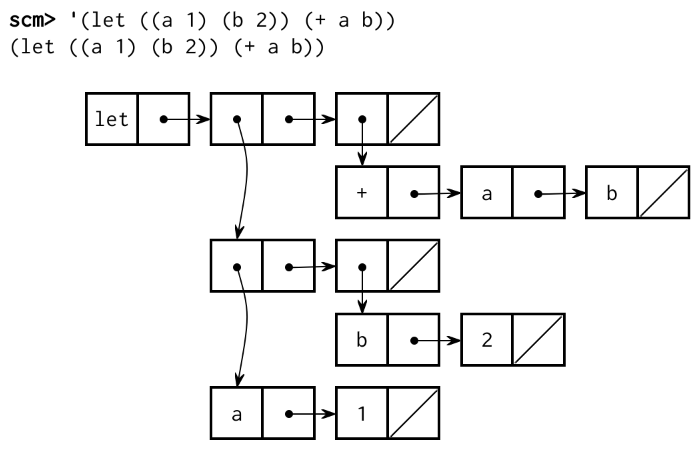
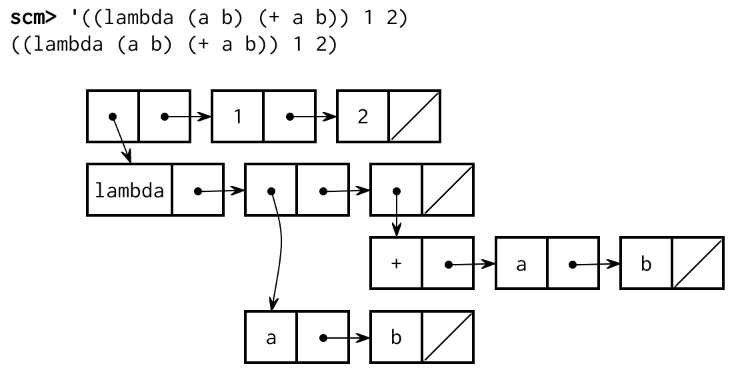
For example, the let special form is equivalent to a call expression that
begins with a lambda expression. Both create a new frame extending the
current environment and evaluate a body within that new environment. Feel free
to revisit Problem 15 as a refresher on how the let form
works.
(let ((a 1) (b 2)) (+ a b))
;; Is equivalent to:
((lambda (a b) (+ a b)) 1 2)
These expressions can be represented by the following diagrams:
| Let | Lambda |
|---|---|
 |
 |
Use this rule to implement a procedure called let-to-lambda that rewrites all
let special forms into lambda expressions. If we quote a let expression
and pass it into this procedure, an equivalent lambda expression should be
returned: pass it into this procedure:
scm> (let-to-lambda '(let ((a 1) (b 2)) (+ a b)))
((lambda (a b) (+ a b)) 1 2)
scm> (let-to-lambda '(let ((a 1)) (let ((b a)) b)))
((lambda (a) ((lambda (b) b) a)) 1)
In order to handle all programs, let-to-lambda must be aware of Scheme
syntax. Since Scheme expressions are recursively nested, let-to-lambda must
also be recursive. In fact, the structure of let-to-lambda is somewhat
similar to that of scheme_eval--but in Scheme! As a reminder, atoms include
numbers, booleans, nil, and symbols. You do not need to consider code that
contains quasiquotation for this problem.
(define (let-to-lambda expr)
  (cond ((atom?   expr) <rewrite atoms>)
        ((quoted? expr) <rewrite quoted expressions>)
        ((lambda? expr) <rewrite lambda expressions>)
        ((define? expr) <rewrite define expressions>)
        ((let?    expr) <rewrite let expressions>)
(else <rewrite other expressions>)))Hint: You may want to implement
zipat the top ofquestions.scmand also use the built-inmapprocedure.scm> (zip '((1 2) (3 4) (5 6))) ((1 3 5) (2 4 6)) scm> (zip '((1 2))) ((1) (2)) scm> (zip '()) (() ())
Note: We used
letwhile defininglet-to-lambda. What if we want to runlet-to-lambdaon an interpreter that does not recognizelet? We can passlet-to-lambdato itself to rewrite itself into an equivalent program withoutlet:;; The let-to-lambda procedure (define (let-to-lambda expr) ...) ;; A list representing the let-to-lambda procedure (define let-to-lambda-code '(define (let-to-lambda expr) ...)) ;; An let-to-lambda procedure that does not use 'let'! (define let-to-lambda-without-let (let-to-lambda let-to-lambda-code))
Part IV: Extra Credit
Note: During regular Office Hours and Project Parties, the staff will prioritize helping students with required questions. We will not be offering help with either extra credit problems unless the queue is empty.
Problem 19 (2 pt)
Complete the function optimize_tail_calls in scheme.py. It returns an
alternative to scheme_eval that is properly tail recursive. That is, the
interpreter will allow an unbounded number of active tail calls in constant
space.
The Thunk class represents a thunk, an expression that needs to be
evaluated in an environment. When scheme_optimized_eval receives a non-atomic
expression in a tail context, then it returns an Thunk instance. Otherwise,
it should repeatedly call original_scheme_eval until the result is a value,
rather than a Thunk.
A successful implementation will require changes to several other functions,
including some functions that we provided for you. All expressions throughout
your interpreter that are in a tail context should be evaluated by calling
scheme_eval with True as a third argument. Your goal is to determine which
expressions are in a tail context throughout your code.
Once you finish, uncomment the following line in scheme.py to use your
implementation:
scheme_eval = optimize_tail_calls(scheme_eval)Problem 20 (1 pt)
Macros allow the language itself to be extended by the user. Simple macros can
be provided with the define-macro special form. This must be used like a
procedure definition, and it creates a procedure just like define. However,
this procedure has a special evaluation rule: it is applied to its arguments
without first evaluating them. Then the result of this application is
evaluated.
This final evaluation step takes place in the caller's frame, as if the return value from the macro was literally pasted into the code in place of the macro.
Here is a simple example:
scm> (define (map f lst) (if (null? lst) nil (cons (f (car lst)) (map f (cdr lst)))))
scm> (define-macro (for formal iterable body)
....     (list 'map (list 'lambda (list formal) body) iterable))
scm> (for i '(1 2 3)
....     (print (* i i)))
1
4
9
(None None None)
The code above defines a macro for that acts as a map except that it doesn't
need a lambda around the body.
In order to implement define-macro, implement complete the implementation for
do_define_macro, which should create a MacroProcedure and bind it to the
given name as in do_define_form. Then, update scheme_eval so that calls to
macro procedures are evaluated correctly.
Hint : Use the
apply_macromethod in theMacroProcedureclass to apply a macro to the operands in its call expression. This procedure is written to interact well with tail call optimization.
Conclusion
Congratulations! You have just implemented an interpreter for an entire language! If you enjoyed this project and want to extend it further, you may be interested in looking at more advanced features, like let* and letrec, unquote splicing, error tracing, and continuations.